
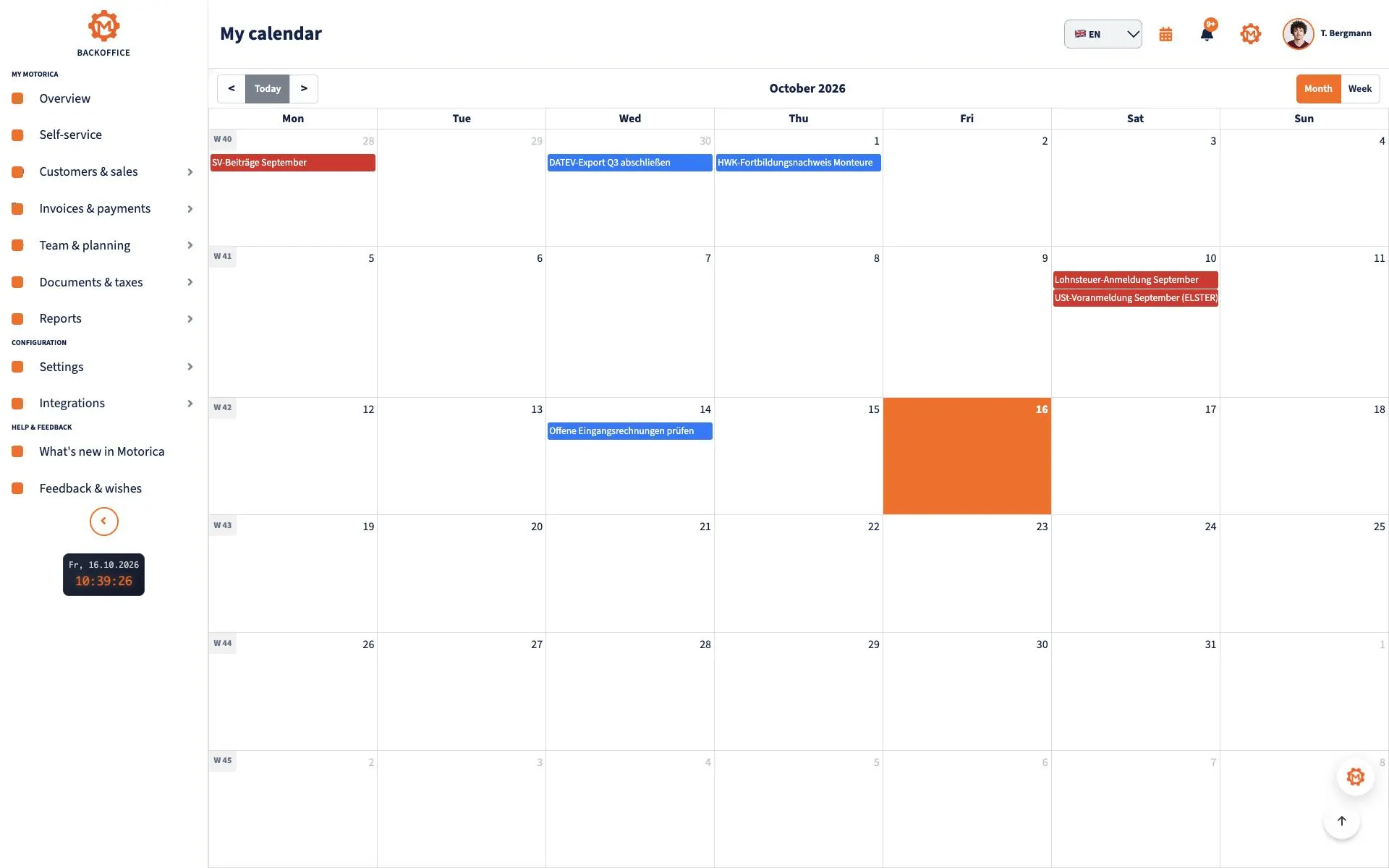
What weekly planning is for
If you work for yourself, you must balance client work, enquiries, quotes, invoices, administration and rest. A task list alone cannot tell you whether all of that fits into your available time. A weekly plan connects outcomes, deadlines and capacity. It is adjustable, not a promise that nothing unexpected will happen.
Set aside roughly 20–45 minutes at the end of the previous week or before your first working day. That is a starting point, not a scientifically fixed duration. Briefly revisit the plan each day; adapt the routine to shifts, site visits and caring responsibilities.
A six-step method
1. Collect tasks and check deadlines
Put outstanding work from projects, messages and last week in one place. Check confirmed appointments, promised deliverables, personal commitments and deadlines. A due date is not working time: a quote due Thursday might need a work block on Tuesday. Enter fixed appointments and absences first.
2. Choose priorities and weekly outcomes
Pick one to three verifiable outcomes, such as “send the draft to the client” rather than “work on the project”. Sorting by importance and urgency may help: handle important near-term commitments first; schedule important but less urgent work; limit or delegate less important interruptions where possible; drop unnecessary tasks. This four-quadrant approach, often called the Eisenhower Matrix, is a decision aid, not an objective score. Consider promises, dependencies and effort too.
3. Calculate actual capacity
Subtract fixed appointments, travel, breaks and existing commitments from your available working hours. Estimate key tasks and split large ones into manageable steps. Leave free capacity for questions and delays. A 20% buffer can be a starting example, not a universal rule: a week of site visits may need more; a quiet week may need less. Do not allocate every minute.
4. Reserve working time
In a time-based calendar, reserve blocks for client projects, quotes, customer acquisition, invoices and administration. This is time blocking. Put focus work at times that suit your own energy; group small similar tasks if that fits your availability. Keep fixed client appointments distinct from movable work blocks. If the hours do not add up, renegotiate scope or deadline, delegate suitable work or defer a lower priority. An overbooked calendar does not solve the problem.
5. Record due dates and reminders
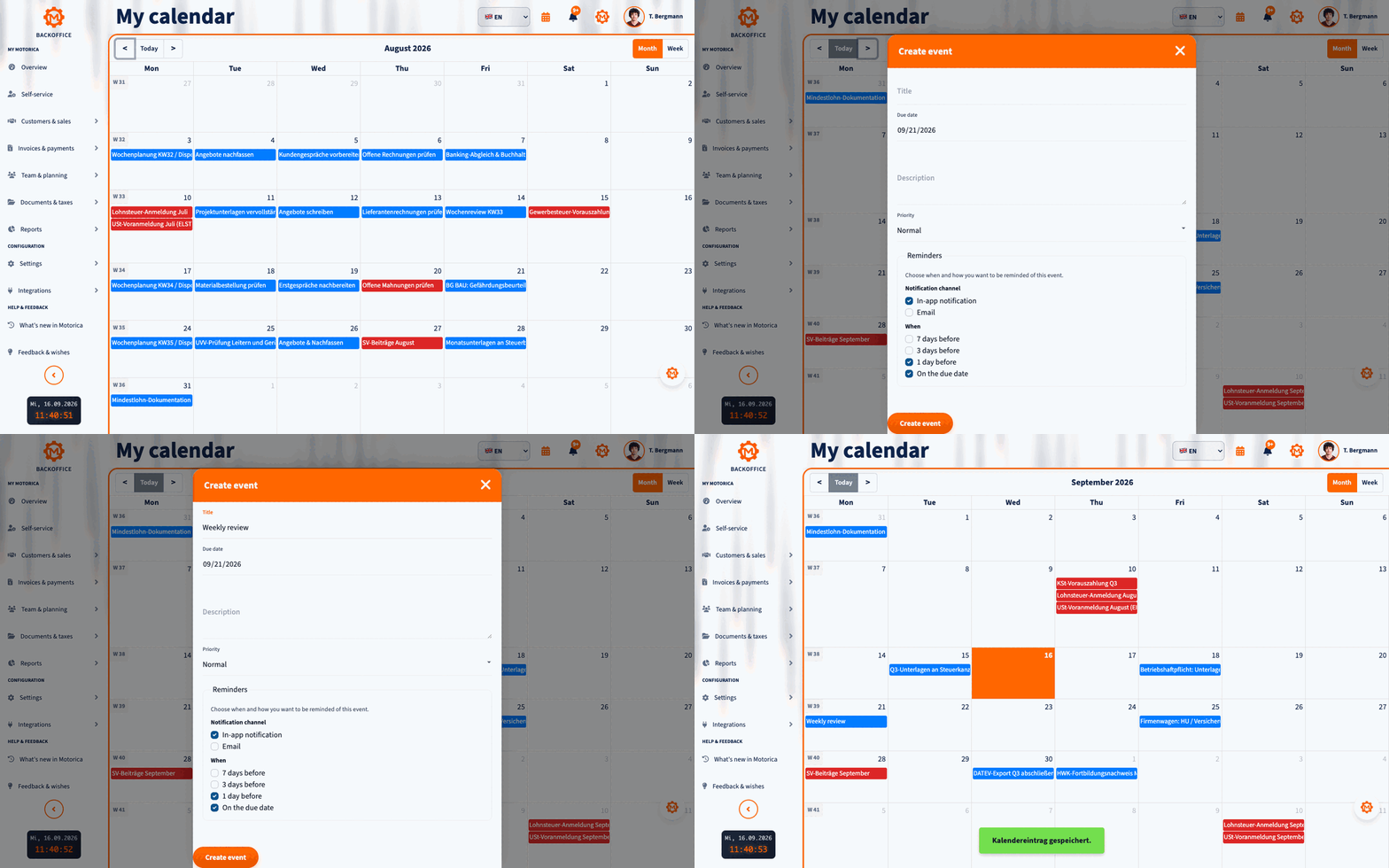
For each important task, note the real deadline and, if helpful, an earlier internal check. In Motorica’s personal calendar, you can create a dated entry with a title, description, priority and reminders. It shows due dates as all-day entries; it is not a substitute for hourly focus blocks in a time-based calendar. Put sensitive customer data only where access is appropriate.
Animation: How to create a calendar entry
6. Adjust daily and learn weekly
Spend a few minutes at the beginning or end of each day checking new commitments, due tasks and upcoming blocks. After a disruption, deliberately reschedule a block and tell stakeholders early if a promised deadline is at risk. At week’s end, compare planned and actual durations. What slipped, what took longer, what routine can be simplified? A repeatedly deferred task calls for a decision: a smaller next step, a new date, delegation or deletion.
Example: a realistic service-provider week
Thomas has a 35-hour weekly window for work and breaks. Client visits and travel already take eight hours; breaks and fixed administration take five. That leaves 22 hours before allowing for a buffer. He might reserve four hours for unexpected work, then allocate the remaining 18 to finishing a project, two quotes and invoices. These are illustrative numbers, not a recommended ratio.
- Monday: Client visit; then project draft and questions.
- Tuesday: Personal appointment; quote 1 and project work.
- Wednesday: Client call; quote 2, then buffer.
- Thursday: Promised draft deadline; review first, then send and invoice.
- Friday: No new commitment; administration, open buffer and weekly review.
Thursday is the delivery deadline; review happens beforehand. If a visit is cancelled or a project runs long, adjust the plan rather than silently removing rest.
Example Monday: readable time blocks
This is a separate day example, not a mandatory schedule. Each line is its own block in a time-based calendar:
- 08:30–09:00: Plan the day and check email.
- 09:00–11:00: Focus block for client project A.
- 11:00–11:30: Questions and short replies.
- 11:30–12:30: Prepare a quote.
- 12:30–13:15: Break.
- 13:15–15:15: Focus block for delivery of project B.
- 15:15–16:00: Invoices and administration.
- 16:00–16:30: Buffer for unexpected work.
- 16:30–17:00: Wrap up and plan tomorrow.
The nine blocks follow one another without gaps. In practice, start times, lengths and order can change; especially the buffer must remain flexible.
Copyable weekly checklist
- Check promises, deadlines, client meetings and personal appointments.
- Carry over, clarify or remove last week’s unfinished tasks.
- Choose one to three verifiable weekly outcomes.
- Calculate available hours after meetings, travel and breaks.
- Break large tasks down and estimate their duration roughly.
- Allow for client work, quotes/acquisition, invoices and administration.
- Reserve work blocks before their respective deadlines.
- Leave visible buffers and breaks.
- Record important due dates and reminders in the appropriate calendar.
- Schedule a short daily check and weekly review.
Frequently asked questions
How much of my week should I book?
Only what fits your actual capacity. No blanket 60%, 80% or 90% rule suits every job. Start with a visible buffer and adjust it to your actual interruptions.
How is a deadline different from a work block?
A deadline is the latest promised date for an outcome. A work block is time spent producing it. A Friday delivery may need several blocks on Tuesday and Thursday.
Do I need a particular app?
No. A task list, a calendar for appointments and work time, and a reliable place for due dates are enough. Consistent use matters more than the tool. Motorica’s personal calendar supports dated entries and reminders; plan hourly blocks in a suitable time-based calendar.
Sources and context
Time estimates and the example week are editorial illustrations, not proven performance claims. For terminology and calendar features, see Todoist on time blocking and Google Calendar on tasks and deadlines. The description of Motorica’s personal calendar was checked against its current Backoffice screen and fields. Reviewed September 2026.