
What is MIRA?
MIRA is Motorica’s AI assistant. It helps summarise documents such as incoming invoices, till receipts, other receipts and official letters more clearly, make important details visible and flag possible points to check.
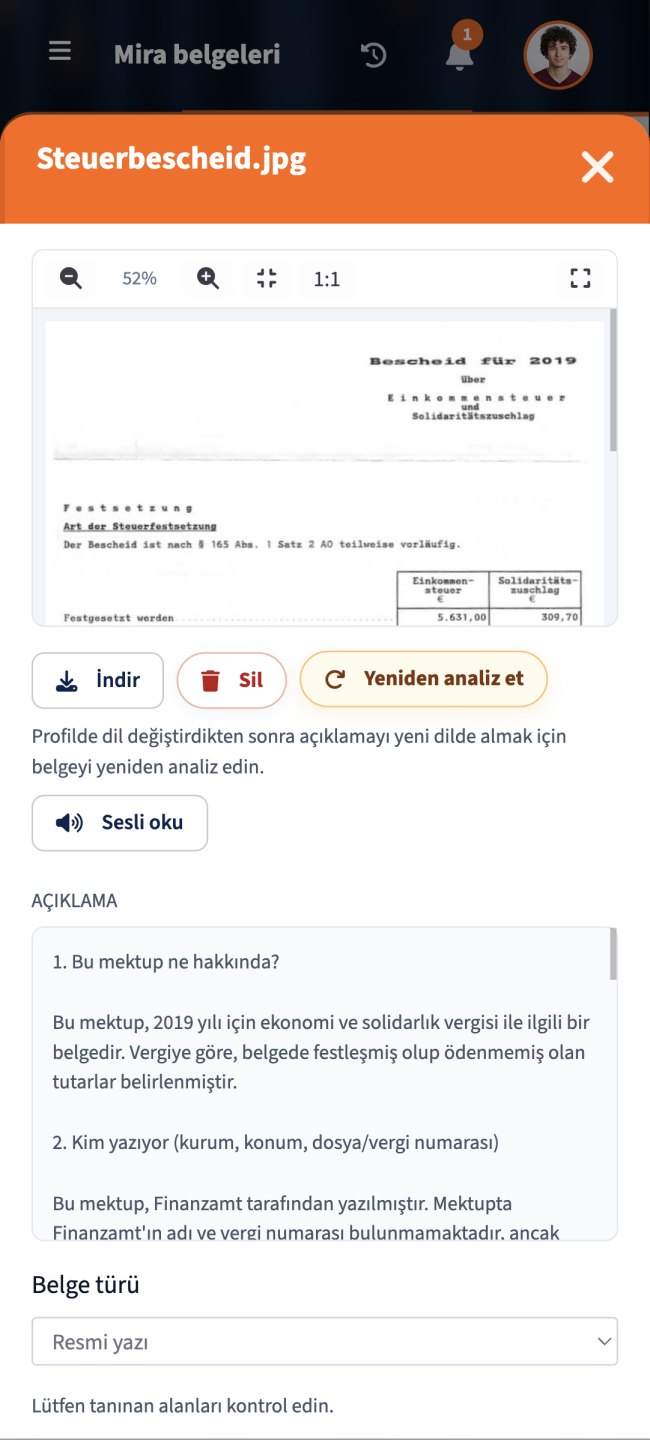
AI for documents, receipts and official letters
MIRA helps self-employed people and small businesses understand incoming invoices, till receipts, other receipts and official letters faster. Recognised content such as amounts, senders, dates, deadlines and possible points to check is presented more clearly and made usable in Motorica’s digital office.
Many self-employed people lose time because important information in receipts, invoices and official letters is hard to identify. MIRA helps to make such documents easier to understand: What does the letter say? Which amounts matter? Is there a deadline? Which details should be checked? This turns confusing correspondence into a clear task in the digital office.
MIRA is Motorica’s AI assistant for document analysis and straightforward office work. Its purpose is not to make decisions for you, but to make information easier to see. MIRA can summarise documents, organise recognised details and flag points that may need checking. This is particularly useful for incoming invoices, till receipts, other receipts and official letters. It remains important to remember that MIRA is not a substitute for tax advice, legal advice or a professional assessment of an individual case. The final evaluation still rests with you, your tax adviser, a qualified professional or the responsible authority.
MIRA is Motorica’s AI assistant. It helps you do more than simply file documents by making their content easier to understand. Instead of laboriously searching through an official letter, an incoming invoice or a till receipt yourself, you receive a structured summary of the important details. These may include the sender, date, amounts, payment information, deadlines, notes and possible points to check.
MIRA is designed especially for documents that small businesses encounter frequently and that often raise questions. These include incoming invoices, till receipts, other receipts and official letters. Quotes and outgoing invoices are not the main focus of MIRA’s document analysis because they are created directly in Motorica. For incoming documents, however, MIRA helps you understand the content faster and continue processing it appropriately.
The process should remain simple and transparent. You upload a document or capture it with a camera. The text and important content are then recognised. MIRA presents the information in a clearer form and shows you which details may be relevant. Instead of an unstructured PDF archive, this creates a working process: capture the document, understand its content, resolve points that need checking, follow up the task and, if necessary, pass it to a tax adviser or other professional.
Official letters are often difficult to understand because they contain many technical terms, deadlines, reference numbers and formal notices. MIRA can help translate the letter into plain language and highlight important passages. The key point is that MIRA can support understanding and organisation, but cannot make a legal decision. Professional advice should be sought in cases involving an objection, appeal, payment request, hearing or unclear deadline.
With receipts, simply saving a photo is not enough. Bookkeeping requires details such as the supplier, invoice date, amount, VAT, payment method and purpose. MIRA can make recognised information visible and help you classify the receipt more accurately. Nevertheless, amounts, tax rates and the business purpose should be checked before data is used for bookkeeping, tax advice or input tax deduction.
Many self-employed people in Germany work to high professional standards but struggle with official German, tax terminology or formal correspondence. MIRA can explain documents more clearly in the preferred language. This is especially important for founders, service providers and small teams working in a multilingual environment. The translation and explanation are intended to make the content easier to understand, but they are not a substitute for a binding professional assessment.
AI can structure documents, explain them and reveal possible points to check. It must not be understood as making a binding decision on whether a tax assessment is correct, whether an appeal is advisable or whether a receipt will be accepted in full for tax purposes. This boundary is important. MIRA is a tool for guidance, organisation and preparation—not a substitute for tax advice, legal advice or a decision by an authority.
MIRA provides the greatest benefit when you do not accept the analysis blindly but use it as a structured review process. The AI shows you what it has recognised. You check whether the details are plausible, add missing information and decide which task follows from them. This process reduces chaos and makes your documents more useful.
MIRA is particularly useful for self-employed people and small businesses that receive many documents in their day-to-day operations but have no dedicated bookkeeping or administration department. These include cleaning companies, skilled trade businesses, property maintenance services, house clearance companies, small service providers and teams with a multilingual office environment. In precisely these settings, many small administrative tasks are quickly left undone if they are not immediately understandable and organised.
MIRA is most effective when it is used as part of the Motorica workflow rather than in isolation. A recognised receipt belongs in document storage. An incoming invoice can be prepared for bookkeeping. An official letter can trigger a task or deadline. An open question can be documented and clarified later with a tax adviser. In this way, document analysis becomes part of a well-organised digital office.
FAQ
MIRA is Motorica’s AI assistant. It helps summarise documents such as incoming invoices, till receipts, other receipts and official letters more clearly, make important details visible and flag possible points to check.
MIRA is intended for incoming invoices, till receipts, other receipts and official letters. Quotes and outgoing invoices are created directly in Motorica and are therefore not the main focus of MIRA’s document analysis.
Yes. MIRA can summarise official letters more clearly and structure recognised information such as the sender, reference number, deadlines, amounts, notes and possible points to check. MIRA is not a substitute for legal assessment.
Yes. MIRA can analyse incoming invoices and make important details such as the invoice number, date, sender, amount, VAT, payment information and possible points to check visible. The recognised data should be checked before further processing.
Yes. MIRA can analyse till receipts and other receipts and present recognised details such as the retailer, date, amount, tax portions and payment method more clearly. Particularly with till receipts, the professional review of amounts and tax rates should not be skipped.
Yes. MIRA can explain documents more clearly in the preferred language. This is especially helpful for self-employed people and small teams working in Germany who do not confidently understand every German tax and administrative term.
No. MIRA is not a substitute for tax advice, legal advice or a binding professional assessment. MIRA helps you understand, structure and prepare documents. Tax or legal decisions should be reviewed by qualified professionals.
MIRA can make recognised deadlines and notices visible. However, a legally binding deadline calculation should not be derived from this without checking. Deadlines in official letters, tax assessments, appeals or objections should be verified separately.
MIRA is particularly suitable for self-employed people, cleaning companies, skilled trade businesses, property maintenance services, house clearance companies, small service providers and multilingual teams that want to understand documents faster and organise office work more effectively.
MIRA helps classify documents faster, recognise important details, reveal open points and prepare tasks more effectively in the digital office. This means less time spent searching, less uncertainty and more structure in everyday office work.